
下載app免費(fèi)領(lǐng)取會(huì)員




文章來源:萬(wàn)聯(lián)Revit開發(fā)

首先說一下Revit體量里的放樣都有哪些api:
1、通過輪廓和方向生成幾何體
FormNewExtrusionForm(boolisSolid,ReferenceArrayprofile,DB.XYZdirection);
2、通過輪廓線生成面
FormNewFormByCap(boolisSolid,ReferenceArrayprofile);
3、通過面和向量生成體
FormNewFormByThickenSingleSurface(boolisSolid,FormsingleSurfaceForm,DB.XYZthickenDir);
4、通過輪廓組生成體
FormNewLoftForm(boolisSolid,ReferenceArrayArrayprofiles);
5、通過放樣路徑和輪廓組生成幾何體
FormNewSweptBlendForm(boolisSolid,ReferenceArraypath,ReferenceArrayArrayprofiles);
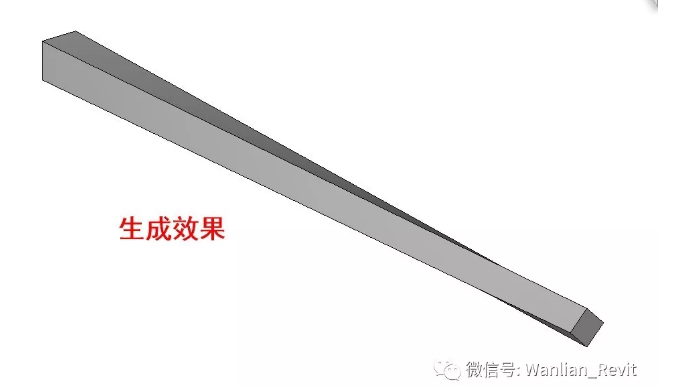
這里我們使用NewSweptBlend來根據(jù)某條曲線的路徑生成對(duì)應(yīng)截面的體量模型。
方法介紹如下:
public SweptBlend NewSweptBlend(

	bool isSolid,

	Curve path,

	SketchPlane pathPlane,

	SweepProfile bottomProfile,

	SweepProfile topProfile

)
參數(shù)說明
isSolid
類型:System布爾值
指示放樣模型是“實(shí)心”還是“虛心”。
路徑
類型:Autodesk.Revit.DBCurve
放樣模型的路徑。路徑應(yīng)該是一條曲線。或者,路徑可以是一條草繪曲線,并且該曲線不需要引用現(xiàn)有幾何圖形。
路徑平面
類型:Autodesk.Revit.DBSketchPlane
路徑的草圖平面。當(dāng)您要?jiǎng)?chuàng)建位于現(xiàn)有平面上的2D路徑時(shí),使用此選項(xiàng)。可以是從幾何圖形獲得的曲線,或引用的曲線。
bottomProfile
類型:Autodesk.Revit.DBSweepProfile
放樣模型的底部形狀。它應(yīng)該是一個(gè)曲線環(huán)。輪廓必須位于XY平面中。
topProfile
類型:Autodesk.Revit.DBSweepProfile
放樣模型的頂部形狀。它應(yīng)該是一個(gè)曲線環(huán)。輪廓必須位于XY平面中。
例子:
注意:此方法必須要在族文檔里執(zhí)行,不能在項(xiàng)目文檔執(zhí)行。
private SweptBlend SweptBlend(Autodesk.Revit.DB.Document document, SketchPlane sketchPlane){SweptBlend newSweptBlend = null;// make sure we have a family documentif (true == document.IsFamilyDocument){// top and bottom profiles and path curveXYZ pnt1 = new XYZ(0, 0, 0);XYZ pnt2 = new XYZ(1, 0, 0);XYZ pnt3 = new XYZ(1, 1, 0);XYZ pnt4 = new XYZ(0, 1, 0);XYZ pnt5 = new XYZ(0, 0, 1);CurveArrArray arrarr1 = new CurveArrArray();CurveArray arr1 = new CurveArray();arr1.Append(Line.Bound(pnt1, pnt2));arr1.Append(Line.Bound(pnt2, pnt3));arr1.Append(Line.Bound(pnt3, pnt4));arr1.Append(Line.Bound(pnt4, pnt1));arrarr1.Append(arr1);XYZ pnt6 = new XYZ(0.5, 0, 0);XYZ pnt7 = new XYZ(1, 0.5, 0);XYZ pnt8 = new XYZ(0.5, 1, 0);XYZ pnt9 = new XYZ(0, 0.5, 0);CurveArrArray arrarr2 = new CurveArrArray();CurveArray arr2 = new CurveArray();arr2.Append(Line.Bound(pnt6, pnt7));arr2.Append(Line.Bound(pnt7, pnt8));arr2.Append(Line.Bound(pnt8, pnt9));arr2.Append(Line.Bound(pnt9, pnt6));arrarr2.Append(arr2);SweepProfile bottomProfile = document.Application..NewCurveLoopsProfile(arrarr1);SweepProfile topProfile = document.Application..NewCurveLoopsProfile(arrarr2);XYZ pnt10 = new XYZ(5, 0, 0);XYZ pnt11 = new XYZ(0, 20, 0);Curve curve = Line.Bound(pnt10, pnt11);// here rectangular swept blendnewSweptBlend = document.Family.NewSweptBlend(true, curve, sketchPlane, bottomProfile, topProfile);if (null != newSweptBlend){// move to proper placeXYZ transPoint1 = new XYZ(11, 32, 0);ElementTransformUtils.MoveElement(document, newSweptBlend.Id, transPoint1);}else{throw new Exception("Failed to new SweptBlend.");}}else{throw new Exception("Please open a Family document before invoking this command.");}return newSweptBlend;}
本文版權(quán)歸腿腿教學(xué)網(wǎng)及原創(chuàng)作者所有,未經(jīng)授權(quán),謝絕轉(zhuǎn)載。

上一篇:CAD教程 | 視頻教程:解決CAD偏移距離與實(shí)際數(shù)據(jù)不匹配的問題




推薦專題













- 趾板設(shè)計(jì)新方法:利用Civil3D和Revit玩轉(zhuǎn)趾板參數(shù)化
- Revit教程 | Revit在平面視圖如何范圍顯示的圖文教程(文/柏慕哲)
- Revit教程 | Revit預(yù)算版之基本設(shè)置(稿/羊兆亮)
- 酒店項(xiàng)目BIM深化:空調(diào)機(jī)房(5.關(guān)于組合式空調(diào)箱設(shè)備的說明及精細(xì)度表達(dá))
- 酒店項(xiàng)目BIM深化:空調(diào)機(jī)房(4.新建空調(diào)機(jī)房工程項(xiàng)目)
- 酒店項(xiàng)目BIM深化:空調(diào)機(jī)房(設(shè)備層空調(diào)機(jī)房系統(tǒng)圖紙分析)
- 酒店項(xiàng)目BIM深化:空調(diào)機(jī)房(課程說明)
- 允匠裝配式支架設(shè)計(jì)軟件(Revit插件)——廣大機(jī)電BIMer福利!
- 酒店項(xiàng)目BIM建模:暖通專業(yè)模型(模型后期處理)
- 酒店項(xiàng)目BIM建模:暖通專業(yè)模型(暖通水系統(tǒng)模型-下篇)


